
Colibri runs on the laptop you already own
A free engine that runs real AI models on your own computer: offline, no graphics card, nothing sent to anyone's server. Everyone writes about the 372 GB version, so most people assume it isn't for them. There's a 4 GB one in the same table. Here's how to find your row, what it'll cost you in time, and what it's actually good for.

There's a good chance your computer can run a real AI model tonight, offline and free, with no graphics card and nothing sent to anyone else's server.
Not the giant model everybody writes about; that one needs a 372-gigabyte download. But in the same project's own table, one row above it, sits a version that needs four gigabytes of disk and eight gigabytes of memory. A laptop from 2016 clears that.
Hardly anyone knows that row exists, so this issue is a walkthrough: check two numbers on your machine, find your row, predict the speed before you download anything, run it, and hand it a first job it will actually do well. By the end you'll know whether it's worth your evening, and what to expect if it is.
What Colibri is
It's called colibrì, Italian for hummingbird, and it lives at github.com/JustVugg/colibri. Free, open source, 24,000 stars, and it reached 937 points on Hacker News in July under a wonderfully modest title: "Getting GLM 5.2 running on my slow computer."
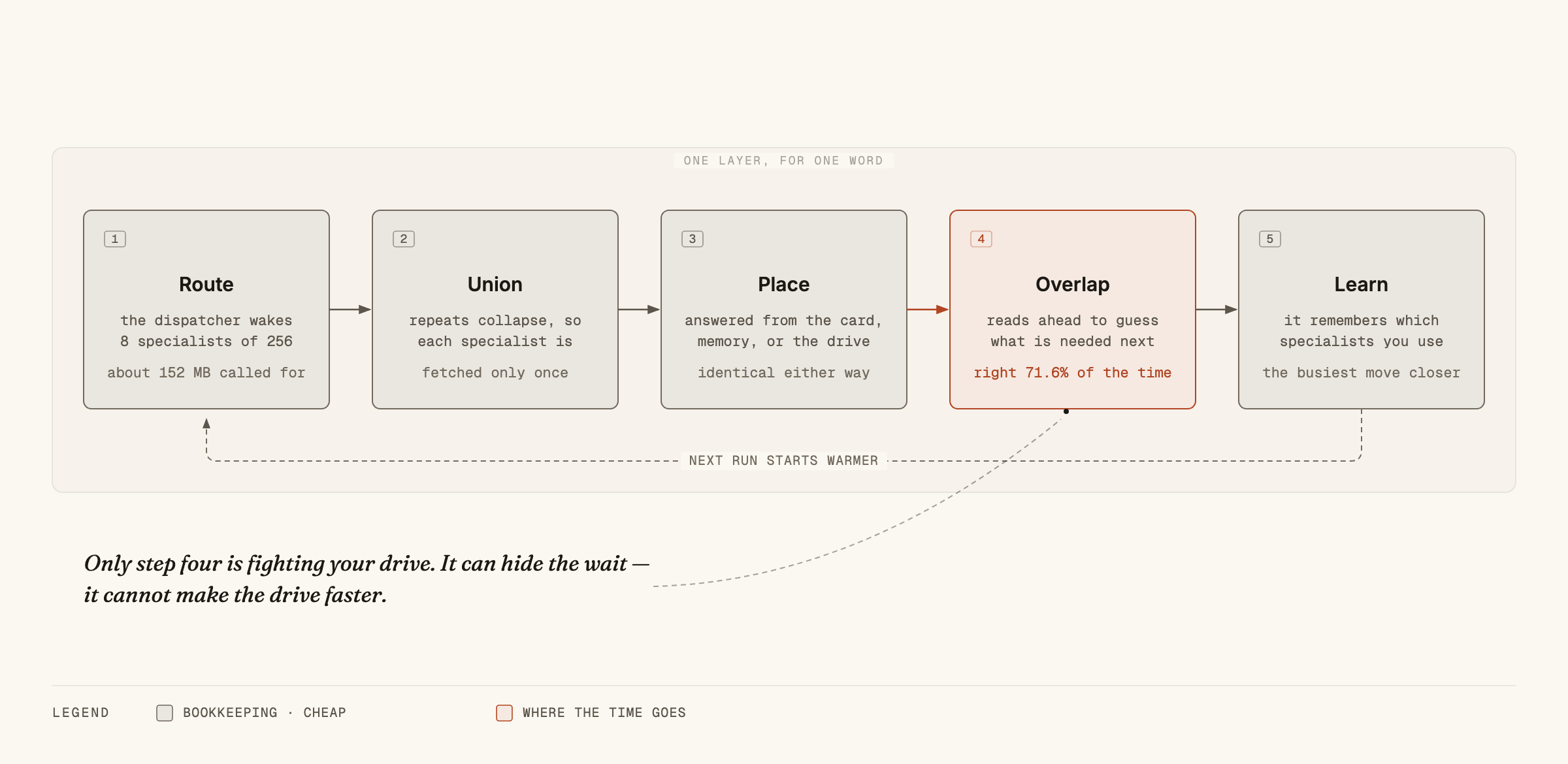
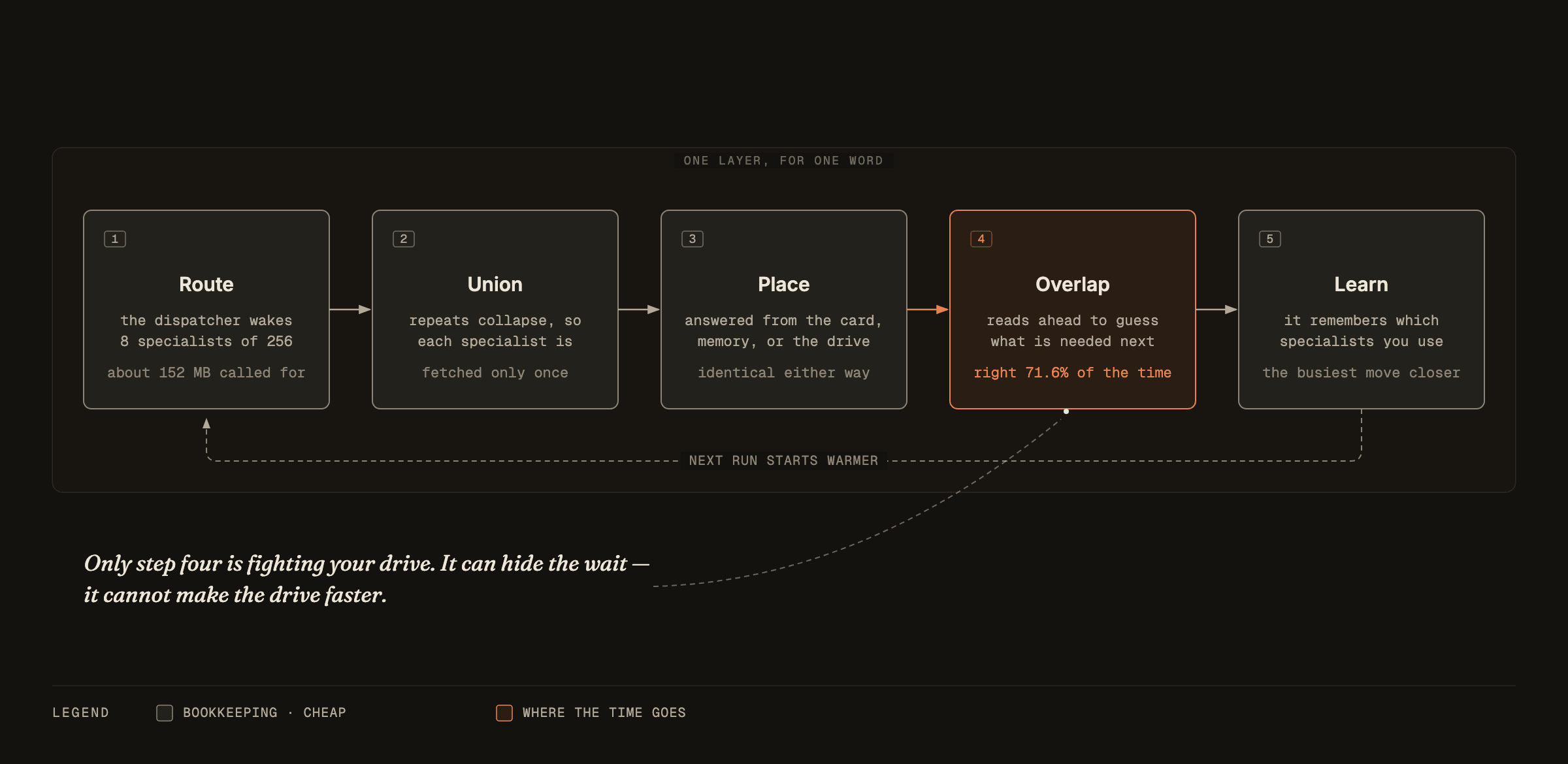
It isn't an AI model. It's the software that runs one, and its trick is refusing to demand that the whole model fit in your computer's memory. It leaves most of the model on your drive and pulls pieces in as it writes.
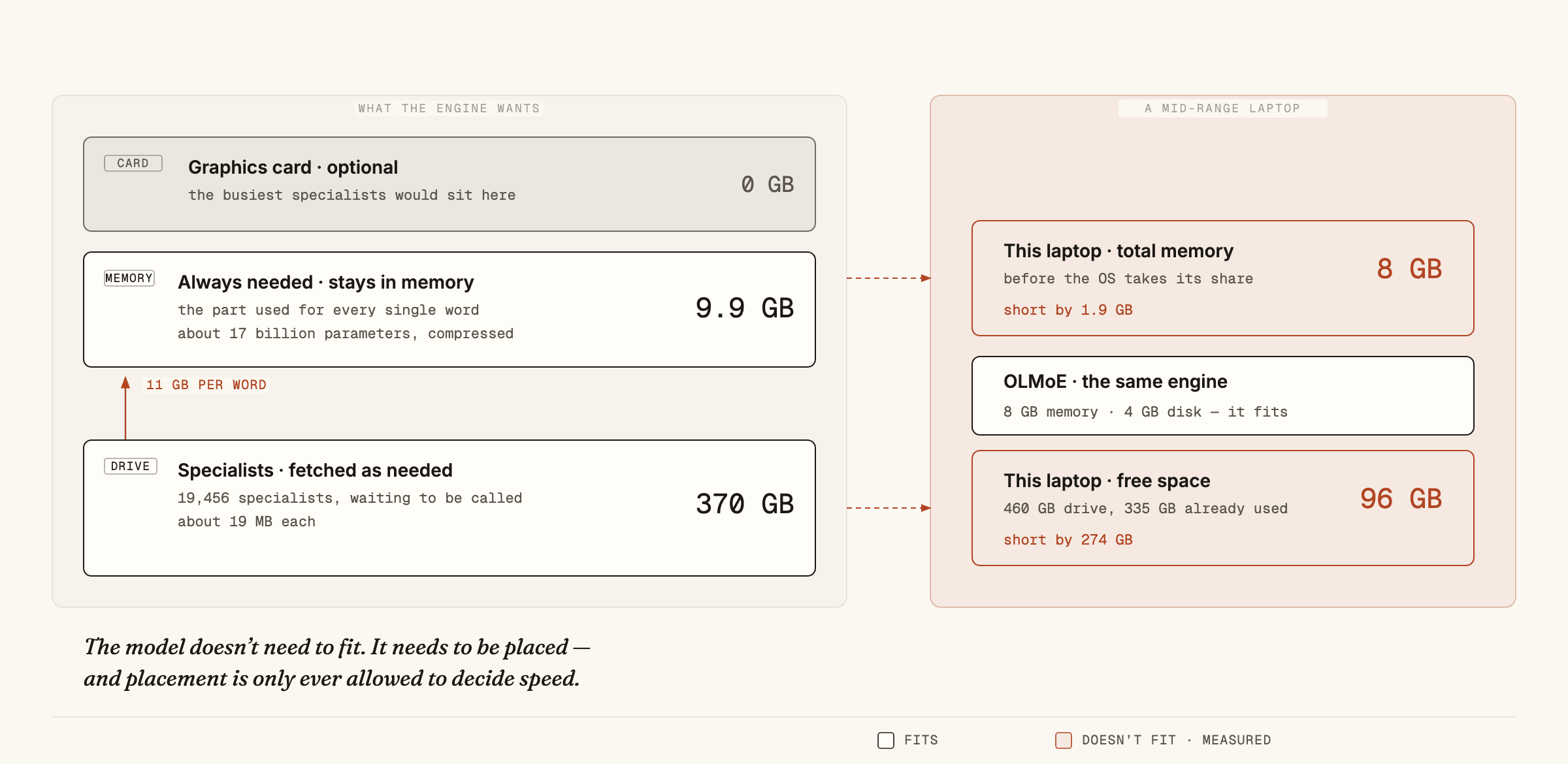
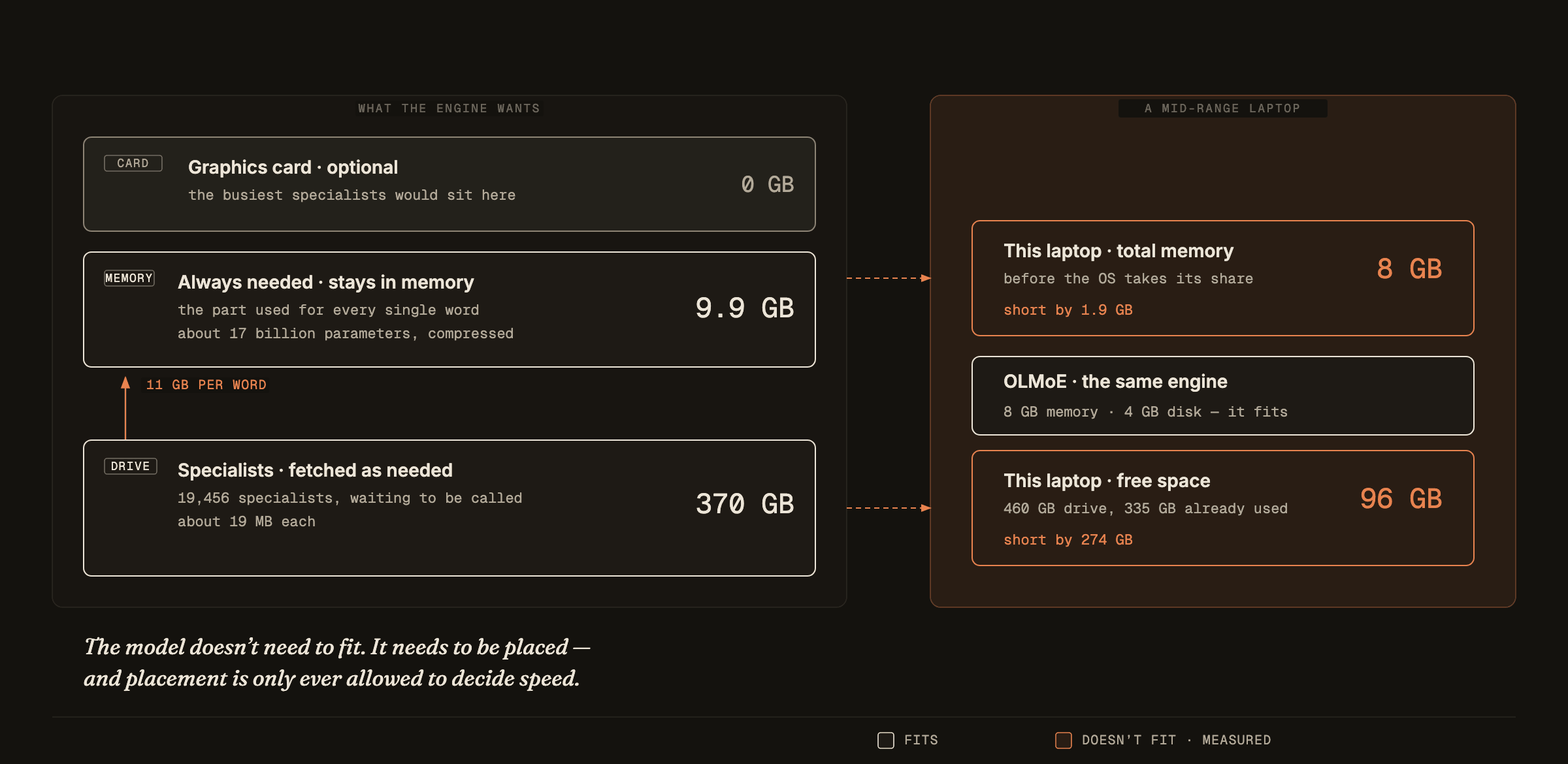
That works because of how modern models are built. Older ones are a single enormous brain where every part fires for every word. Newer ones are thousands of small specialists, and for each word a dispatcher wakes only a handful. Of the big model's 744 billion parameters, about 40 billion get used per word, and only around 11 gigabytes' worth actually change between one word and the next. So the whole model never has to fit in memory. It has to be organised so the next piece is always close at hand.
Step 1: read two numbers off your own machine
On a Mac: Apple menu → About This Mac gives you Memory. Then System Settings → General → Storage for free space.
On Windows: Settings → System → About gives Installed RAM. Then Settings → System → Storage.
Write both down. That's the whole entry exam.
Step 2: find your row
This table comes from the project's own documentation. The last column is mine: how long each download takes at the 17.5 MB/s my connection actually measures. Scale it to yours.
| Model | Drive space | Memory | Graphics card | Download at 17.5 MB/s |
|---|---|---|---|---|
| OLMoE | ~4 GB | 8 GB | not needed | 4 minutes |
| DeepSeek V4 Flash | ~167 GB | 16 GB | not needed | 2.6 hours |
| GLM-5.2 | ~372 GB | 16 GB, 24 comfortable | not needed | 5.9 hours |
| Inkling | ~469 GB | 25 GB | not needed | 7.4 hours |
| Kimi K3 | ~1.6 TB | 32 GB+ | not needed | 25 hours |
Read the graphics-card column first. Not one of these models needs one, and that's the expensive part everybody assumes is the price of entry. The documentation is blunt about it: a graphics card only ever makes things faster.
In practice: with 8 GB of memory you're in the top row, four minutes of downloading away from running something real. With 16 GB and 200 GB spare, DeepSeek V4 Flash is open to you, and it's a serious model. With 24 to 32 GB and half a terabyte free, the famous one is genuinely in reach. Under 8 GB, not yet; that's the honest floor.
My machine is an 8 GB MacBook Air with 96 GB free. It fails the famous model twice, short 1.9 GB of memory and short 274 GB of disk, but it clears the top row easily. Most people are in that exact position and have been told the opposite.
Step 3: predict your speed before you download
The table says whether a model runs. One division says how fast.
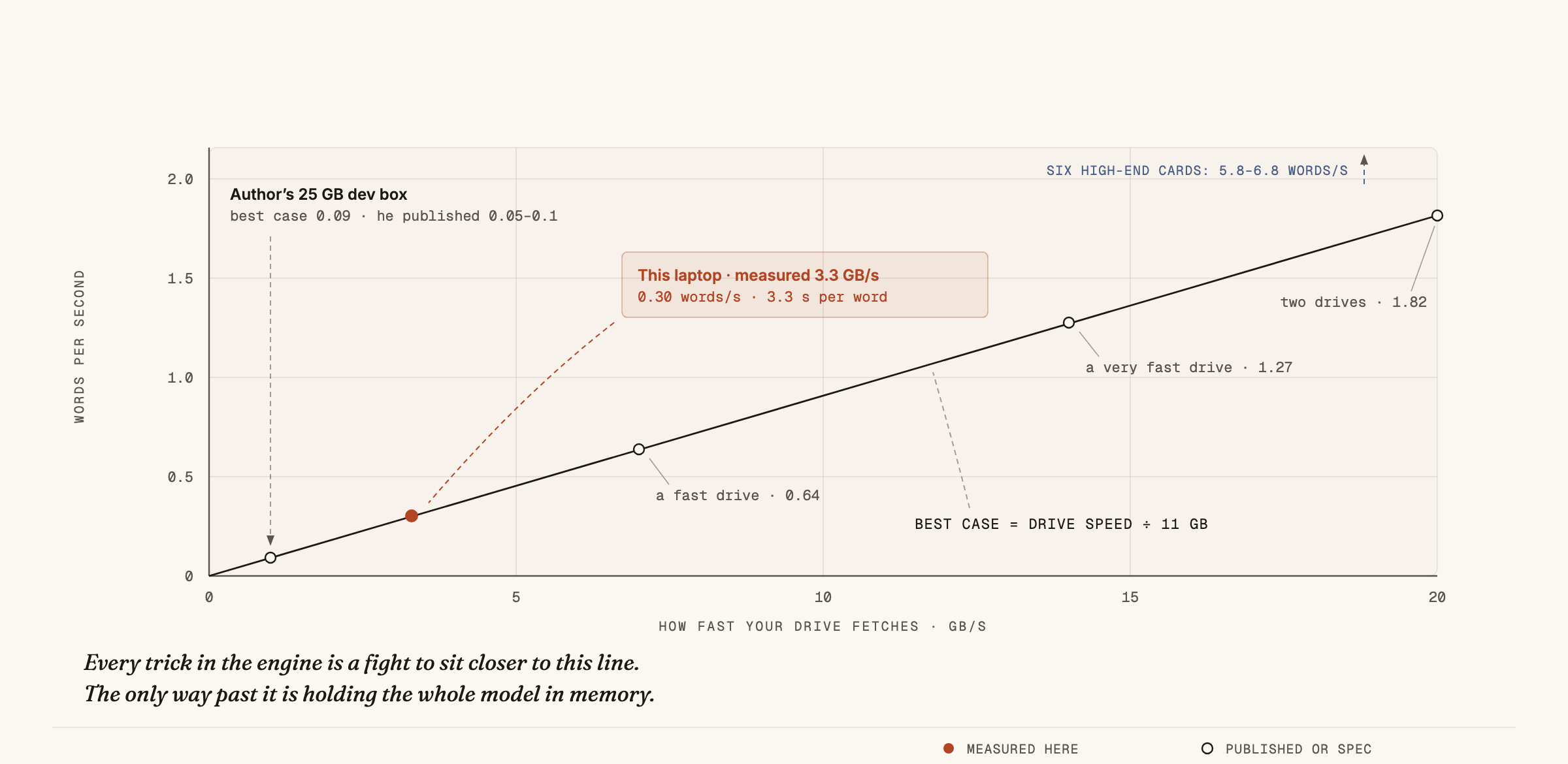
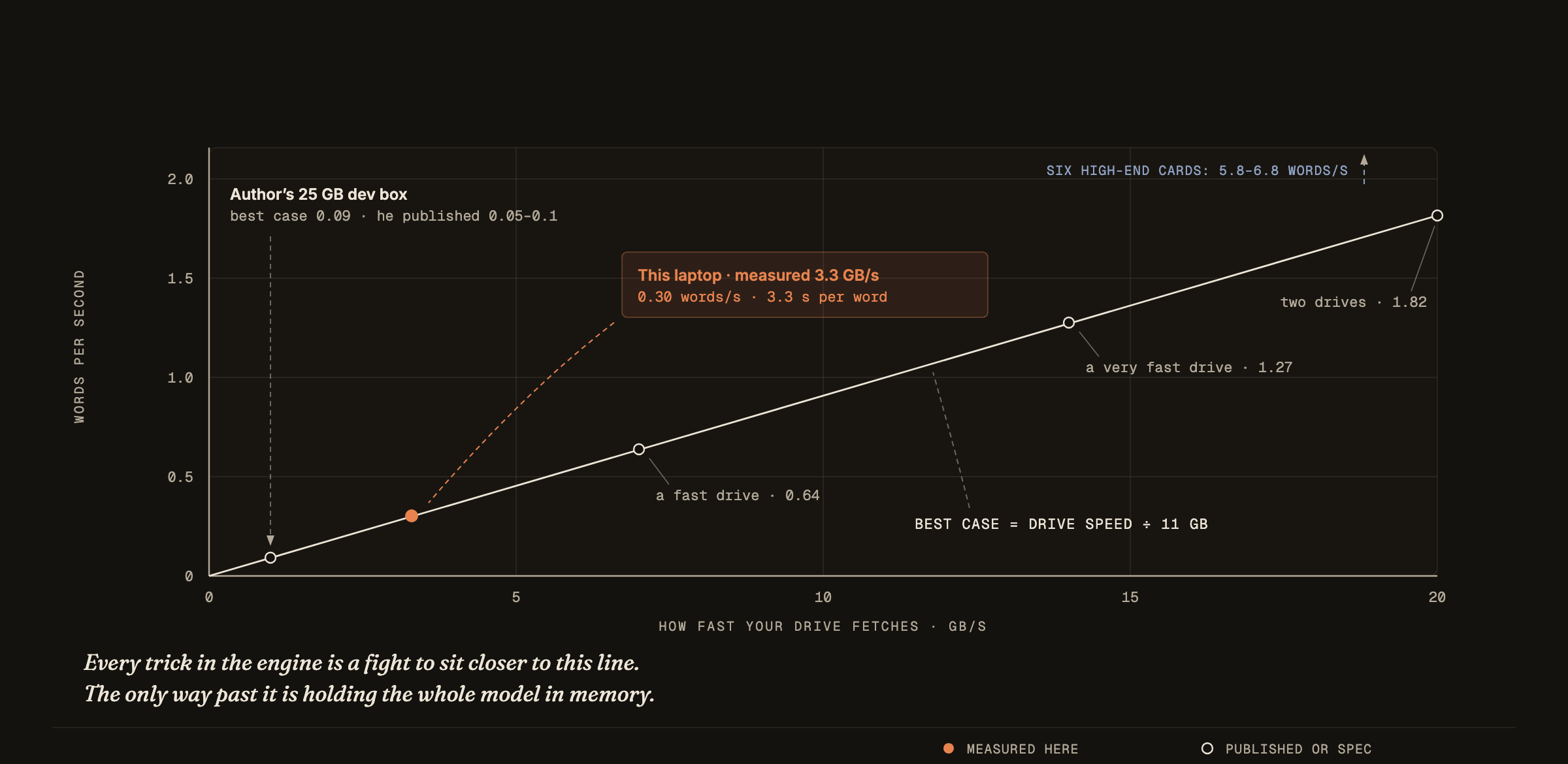
Speed is how much data gets fetched per word, divided by how fast your drive can fetch it. For the big model, the fetch is 11 gigabytes per word.
I measured my drive the way the engine actually uses it: not the number printed on the box, but scattered reads of exactly the size it asks for. The result was 3.3 gigabytes per second, so 11 divided by 3.3 gives 3.3 seconds per word. A single paragraph would take roughly eighteen minutes.
Measure yours on Linux:
fio --name=r --rw=randread --bs=19M --size=4G --direct=1 --filename=testfileOn a Mac, that same command quietly measures your memory instead of your drive, which flatters it enormously. Treat the result as an upper bound on an upper bound.
Run the same sum on the project author's own computer and it lands on the speed he published. The formula predicts a machine it has never seen.
Step 4: install and run it
git clone https://github.com/JustVugg/colibri
cd colibri
make -C c olmoe
COLI_MODEL=/path/to/olmoe ./coli chat
Those are the project's own commands; check the README first, since projects move. Then open the dashboard:
./coli web --model /path/to/olmoeBy the project's description, the dashboard draws all 19,456 specialists lighting up as the model answers, plus a three-dimensional map where specialists that handle similar work (poetry, code, Chinese) drift into clusters based purely on behaviour, not on labels anyone assigned.
What to expect once it's running
This is where most people get disappointed, so set your expectations before the download finishes. A 4 GB model is not a small ChatGPT, and judging it as one will waste your evening. Judge it on the jobs it's built for.
It's genuinely good at work where you hand it the material: summarising a document you paste in, pulling names, dates and amounts out of messy text, sorting things into categories, rewriting in a different tone, drafting a first pass you intend to edit, and answering questions about text you provided.
It's weak at anything that relies on knowledge it has to remember: current facts, long multi-step reasoning, precise arithmetic, and code beyond short snippets. It will also state wrong things confidently, which matters far more when the job is "tell me about X" than when it's "summarise this".
The dividing line: give it the information and ask it to do something with that information, and it's good. Ask it what it knows, and it's shaky.
Step 5: give it a first job worth doing
Don't open it and chat. That's the fastest route to concluding it's useless.
Instead, find a folder with fifty-plus files in it, meeting notes, saved articles, invoices, whatever you have, and have it write a two-line summary of each, overnight. In the morning you have an index of something that was previously an unsearchable pile.
That job fits this tool for three reasons. Nobody is waiting, so slow doesn't matter. Every file is handed to the model, so it plays to the strength above. And it never touches the internet, so nothing leaves your machine.
It's also where the economics land. Per-word pricing is what makes bulk jobs not worth starting; you talk yourself out of processing ten thousand documents because of the bill. Locally, the marginal cost is electricity, and the only question left is whether you can wait.
Two myths that stop people trying
"It'll destroy my drive." It won't. Drives wear out from writing; this only reads. The warning that started the panic refers to a side effect happening in memory, not on disk. Someone in the discussion put it flatly: the program performs no writes, so it doesn't wear your drive at all.
"You need a graphics card." Not for any row in that table. This is the single most expensive misconception in local AI, and it stops people who could start tonight for free.
When it's the wrong tool
If what you want is an instant chatbot, buy an API key. You'll be happier, and it'll cost very little.
This earns its place when slow doesn't matter: overnight batches, documents that legally can't leave your building, anywhere with no internet, and any project where per-word pricing kills it before it starts.
The number I can't explain
One figure keeps pulling at me: 71.6 percent.
That's how often the engine correctly guesses which specialists come next, before it's told. It guesses, fetches early, and that head start is the only reason any of this is quick enough to bother with.
Nobody has published why it's 71.6 and not 50. Something about how these models organise themselves makes their choices partly predictable, and the project has just opened a call for people to map it by watching which specialists handle what.
If that number reaches 90, every row in the table gets faster and nobody buys anything. I want to know what moves it. That's where I'm going next.
— Zulqarnain
Get the next one
New teardowns as they land. Prompts, costs, and the parts that didn’t work.
Free forever. Unsubscribe in one click.